MCP (Model Context Protocol)
Contributors: Marian Klose
An open standard that lets an AI application talk to external tools and data through one common interface instead of a separate custom integration for each.
Definition
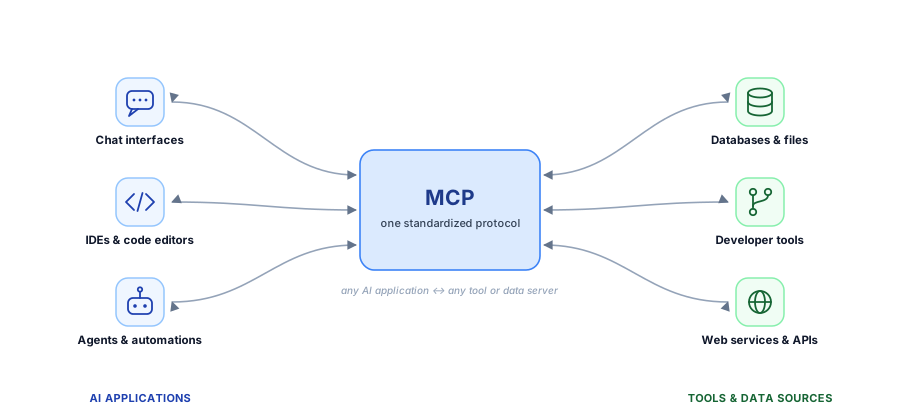
The Model Context Protocol (MCP) is an open protocol, introduced by Anthropic in late 2024 and now maintained as a community specification, that standardizes how large language model (LLM) applications connect to external tools and data sources. Similar to how USB-C replaces the need for many different cables with one shared standard for connecting devices, MCP provides a common protocol that lets AI applications connect to external systems.
Concretely, MCP sets the rules for how an LLM application (e.g., Claude, ChatGPT) and a server talk to each other when using a tool. The exchanges break down into four parts (simplified):
- Tool discovery: The AI application asks: Which tools do you have?
- Tool description: The MCP server answers: Here is each tool, what it does, and which inputs it needs.
- Tool invocation: The AI application says: Run this tool with these arguments.
- Tool result: The MCP server sends the result back in a structured, predictable form after the tool is executed.
Because MCP servers follow the same protocol, MCP-compatible applications can integrate with new tools without writing a custom connector for each one.
In pharmacometrics
Tools are key for agentic workflows in pharmacometrics, because the LLM itself cannot run NONMEM or R code, nor can it access the datasets and model files that are needed to do so. An MCP server allows a team to wrap these tools and expose them to the LLM in a uniform way, so that the LLM can be used to automate tasks like running NONMEM models or generating exploratory data analysis plots.
Example: MCP server exposing a NONMEM run
A pharmacometrics team wraps their NONMEM execution environment in an MCP server that exposes a small set of tools:
submit_run(takes a control stream and executes the run)get_run_status(returns the current status of a run, e.g., pending, running, minimization successful, terminated, etc.)get_results(returns objective function value).
When an LLM harness is connected to this MCP server, it would first check which tools are available. The harness sends a tools/list request to the server:
{ "jsonrpc": "2.0", "id": 1, "method": "tools/list" }The server responds with a machine-readable description of every tool it offers: its name, what it does, and a schema for its inputs:
{
  "jsonrpc": "2.0",
  "id": 1,
  "result": {
    "tools": [
      {
        "name": "submit_run",
        "description": "Launch a NONMEM estimation for a given control stream.",
        "inputSchema": {
          "type": "object",
          "properties": {
            "control_stream": {
              "type": "string",
              "description": "Path to the .mod / .ctl file"
            }
          },
          "required": [
            "control_stream"
          ]
        }
      },
      {
        "name": "get_run_status",
        "description": "Return the current status of a run",
        "inputSchema": {
          "type": "object",
          "properties": {
            "run_id": {
              "type": "string"
            }
          },
          "required": [
            "run_id"
          ]
        }
      },
      {
        "name": "get_results",
        "description": "Return the objective function value of a completed run.",
        "inputSchema": {
          "type": "object",
          "properties": {
            "run_id": {
              "type": "string"
            }
          },
          "required": [
            "run_id"
          ]
        }
      }
    ]
  }
}
The harness converts these definitions into the tool-calling format of its LLM API and includes them in the model’s context. From that point on, the model can decide on its own to call, say, submit_run with a control stream.
If a user then asks the LLM to “run run042.mod in NONMEM and give back the OFV”, the LLM can reason that it needs to call submit_run with the control stream, then poll get_run_status until the run is complete, and finally call get_results to retrieve the objective function value. The LLM can then return this value to the user:
The objective function value for
run042.modis 1234.56.
The interaction is visualized in the following diagram:
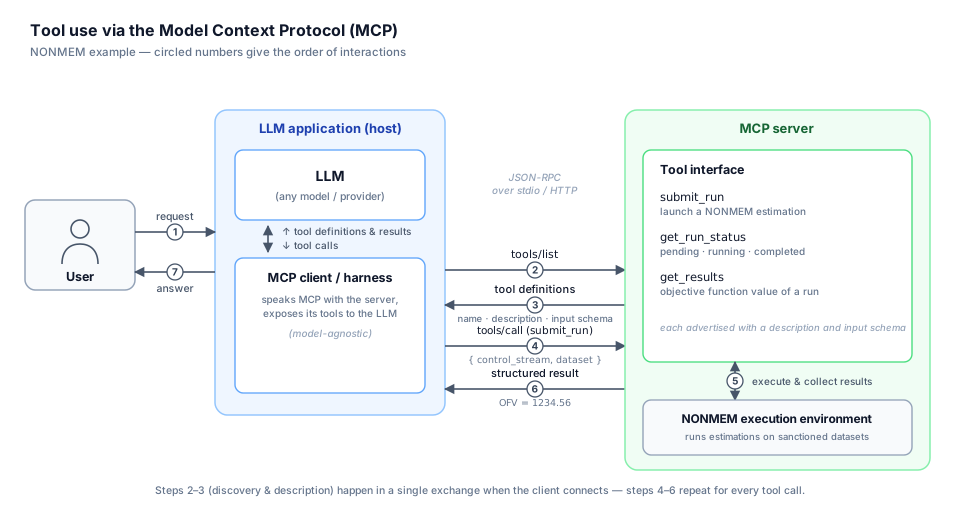
In a properly configured implementation, each action can be logged as a JSON-RPC request/response, making the run traceable.
Further reading
- Model Context Protocol specification: the authoritative spec and SDKs.
- Introducing the Model Context Protocol: the original announcement and motivation.